ZumiLabs Developer Tools Suite

The tools your workflow
has been missing.

Six specialist utilities — file management, cloud dispatch, context-aware bookmarks, browser capture, local web research, and AI audio separation. Built for developer and creator workflows. Installed locally. Your data stays on your machine.

Works with Chrome • Node.js • Python • React • Any web stack

6
Specialist Tools
Local
Data Never Leaves Your Machine
Zero
Telemetry or Tracking
8+
Cloud API Targets

The Suite

Each tool solves a specific problem. No bloat, no overlap — just the right tool for the job.

🖼️ 🎥 📄
React Web Component

Sidekick File Manager

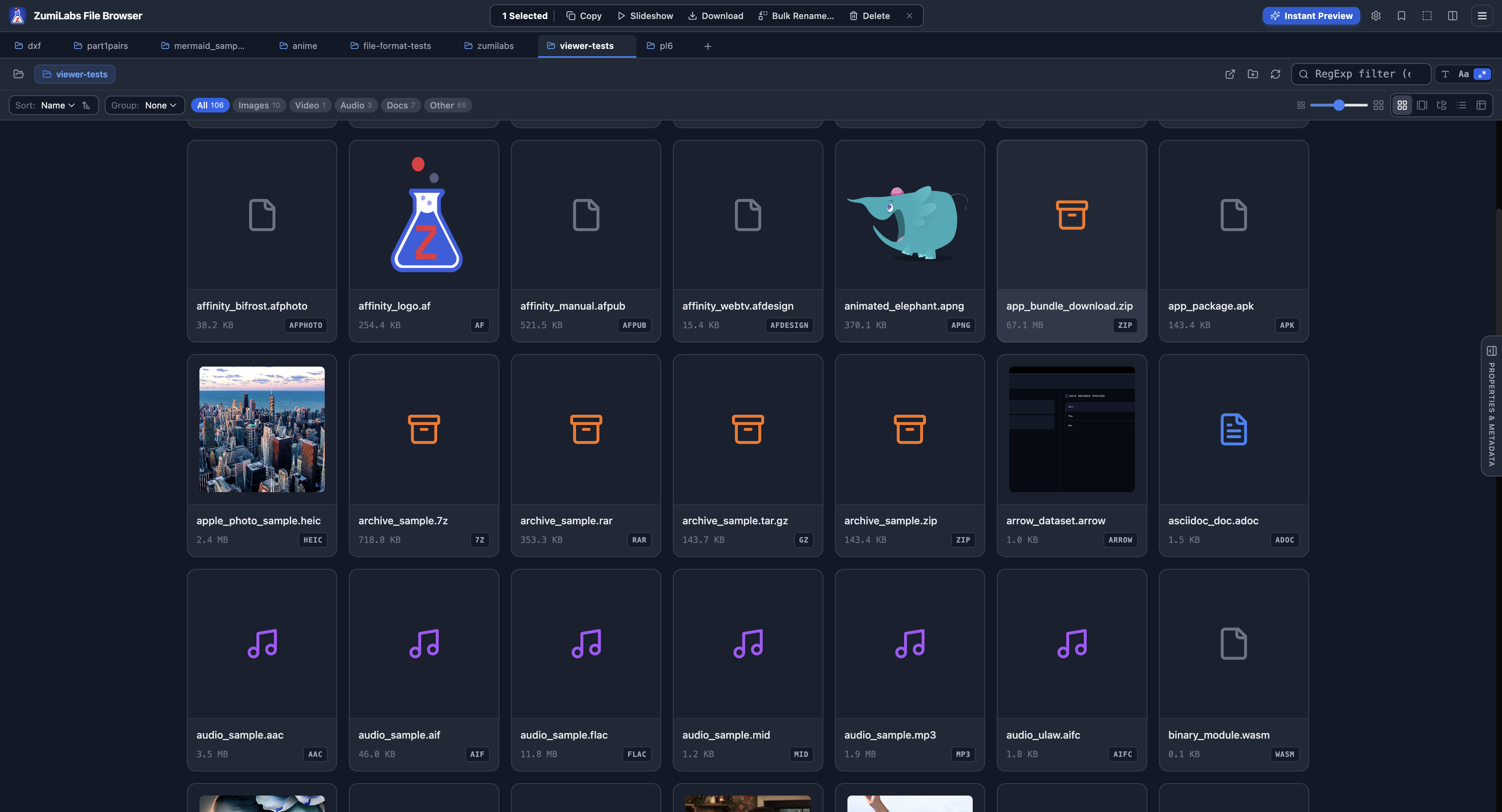
A full file explorer that runs inside your browser — no server required.

Drop Sidekick into any web application and your users get a native-quality file manager that reads and writes directly to their local filesystem. It uses the browser's File System Access API, so no files are uploaded anywhere. Works standalone or embedded in a host React app.

  • Grid, List, and Filmstrip views
  • Video thumbnail extraction
  • Sidecar metadata (.json) scanner
  • Side-by-side folder diffing
  • P2P file transfer (experimental)
  • i18n — English and German included
Drop-in install
<script src="dist/sidekick-manager.iife.js"></script>

<sidekick-manager
  lang="en"
  style="display: block; height: 600px;">
</sidekick-manager>
View full details
Jira Slack GitHub
Node.js Service

ZumiLabs CloudSend

Send files to Jira, Slack, GitHub, Miro, and more — from a single API call.

CloudSend is a lightweight server-side facade that keeps your third-party API keys out of the browser. Client apps authenticate once with a JWT, then send files to any supported target without ever handling raw credentials. One integration to maintain instead of eight.

  • API keys stay server-side, always
  • TypeScript client SDK included
  • OpenAPI docs at /docs
  • Supports Jira, Slack, GitHub, Miro, S3, Drive, Confluence, Contentful
import { CloudSendClient } from '@zumilabs/cloudsend-client';

const client = new CloudSendClient({
  endpoint: 'http://localhost:8081/api/v1',
  token: 'user-jwt-token'
});

await client.upload.jira({
  issueKey: 'KAN-11',
  files: [file]
});
View full details
Chrome Extension (MV3)

CABE

Your bookmarks, filtered automatically by what you're working on right now.

CABE watches the domain you're visiting and surfaces only the bookmarks relevant to that project workspace. Switching from a local dev server to a client's staging environment? Your sidebar updates automatically. No more digging through hundreds of saved links.

  • Auto-switches based on active domain
  • URL template resolver (dynamic bookmarks)
  • Omnibox shortcut integration
  • Sidebar panel — always one click away
Template URL example
// Template stored in CABE:
// https://github.com/org/{project}/issues

// Active project matched: "cloudsend"
// Resolves to:
// https://github.com/org/cloudsend/issues
View full details
Chrome Extension

ZumiLabs OmniCapt

Screenshot and record any tab — individually or in bulk, across multiple viewport sizes.

OmniCapt handles the tedious parts of browser capture. Feed it a list of URLs and target resolutions, and it captures them all, strips cookie banners and overlays automatically before shooting, and saves directly to a folder on your filesystem. Video recording with click highlights included.

  • Batch capture across multiple URLs
  • Desktop and mobile viewport presets
  • Pre-capture rules (hide overlays, banners)
  • Video recording with click highlights
  • Built-in clip merger
  • Saves direct to local folder via FSA
Filename token format
// Configure output naming with tokens:
// {{domain}}/{{title}}_{{width}}x{{height}}
//
// Resolves to:
// github.com/zumilabs-tools_1920x1080.png
View full details
Chrome Extension (MV3)

ZumiLabs OmniBrief

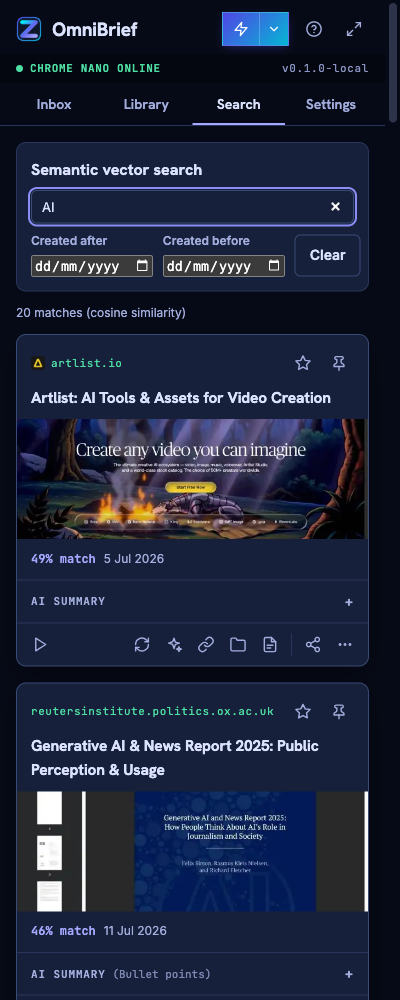
Privacy-first web research companion. Queue links, extract content, and summarize locally.

OmniBrief processes documents and web articles entirely within your browser. By utilizing Google Chrome's built-in Gemini Nano model and an offline vector engine, OmniBrief creates searchable library briefs from queued pages without sending text to remote servers. All assets are stored locally in the browser's OPFS.

  • Local-first Chrome Gemini Nano summarization
  • Offline semantic vector search & collections
  • Background queue for hands-free URL extracting
  • Local OPFS storage for summaries and screenshots
  • Secure PIN key encryption for cloud fallbacks
  • YouTube transcript and PDF summarization
View full details
Python + Node.js Service

ZumiLabs Audio Splitter

Separate vocals, drums, bass, and instrumentals from any audio file using AI.

The Audio Splitter wraps the BS-RoFormer deep learning model in a simple async HTTP API. Submit an audio file, poll for completion, then download individual stems or a zipped package. Runs on CPU out of the box — attach a CUDA GPU for significantly faster processing.

  • State-of-the-art BS-RoFormer model
  • CPU mode standard, CUDA optional
  • Simple REST API — submit, poll, download
  • Download individual stems or zip
Submit a split job
curl -X POST \
  -F "[email protected]" \
  -F "model=model_bs_roformer_ep_317.ckpt" \
  http://localhost:3401/api/v1/jobs
View full details

Specifications

Runtime requirements, storage behaviour, and integration styles at a glance.

Tool Type Runtime Storage Integration
Sidekick Web Component Chromium (FSA API required) IndexedDB — local browser only HTML element or React import
CloudSend Node.js Service Node.js 18+ / Express Server env vars — no client exposure HTTP REST API + TypeScript SDK
CABE Chrome Extension Chrome MV3 Chrome local storage Load unpacked or Chrome Web Store
OmniCapt Chrome Extension Chrome Extension APIs Local directory (FSA) Load unpacked extension
Audio Splitter API Service Node.js + Python 3.10+ Local jobs directory HTTP REST — submit / poll / download

How we build

Three principles that run through every tool in this suite.

🔒

Your data stays yours

Client-side tools read and write directly to your local filesystem. Files are never routed through ZumiLabs infrastructure. Server-side tools like CloudSend keep credentials server-side, away from the browser entirely.

⚙️

Focused and composable

Each tool does one thing well. They're designed to be used independently or composed together — Sidekick feeds files to CloudSend, OmniCapt outputs to a folder Sidekick can browse. No forced bundling.

🛠️

Built for developers

TypeScript types throughout, OpenAPI documentation, Web Component drop-in installs, and REST APIs with predictable shapes. These tools fit into existing workflows rather than demanding you adapt to them.

Common Questions

Sidekick and OmniCapt require Chromium-based browsers (Chrome, Edge, Arc) because they rely on the File System Access API and Chrome Extension APIs respectively. CABE is a Chrome extension. CloudSend and the Audio Splitter are server-side services with no browser dependency.

No. Sidekick uses the browser's native File System Access API to read and write directly on your machine. No files are sent over the network unless you explicitly trigger a CloudSend upload. There is no ZumiLabs server involved in any Sidekick operation.

All third-party API keys (Jira, Slack, GitHub, Miro, etc.) are configured in server environment variables and never returned to the client. Browser code authenticates with a JWT issued by your own server — it only ever sees that token, never the underlying service credentials.

Yes — CPU mode is the default and works on any machine with Python 3.10+ installed. Processing a typical 3-minute track takes a few minutes on CPU. If you have a CUDA-compatible GPU available, the service will use it automatically and processing times drop significantly.

CABE requests access to your bookmarks and the active tab URL — it needs these to match your current context to the right workspace. OmniCapt requests tab capture and file system access. Both extensions declare their permissions in their manifest files so you can review exactly what they need before installing.

Yes. All five tools are in active development and internal use. Get in touch via the contact form if you hit a bug, need a feature, or want to discuss deployment in your organisation.

Ready to put these to work?

Talk to us about getting access, running a trial, or tailoring the tools to your specific workflow.