
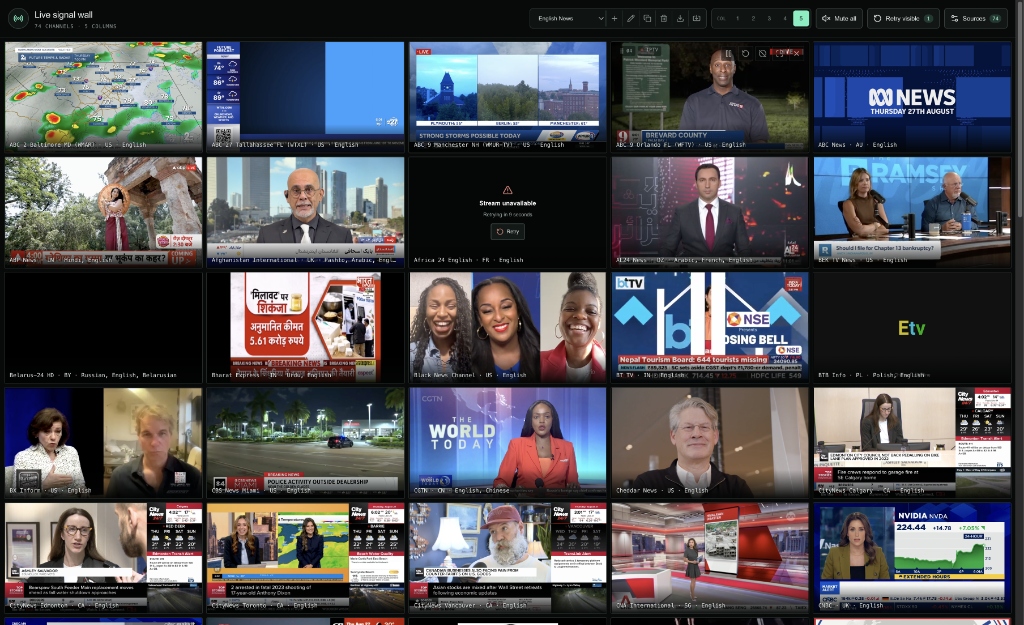
Newsrooms and security operations centres typically rely on dedicated hardware matrices, SDI switchers, and racks of decoders to maintain multi-channel situational awareness. Bringing that experience directly into a client-side browser tab presents a formidable engineering challenge: decoding 70 to 150 simultaneous live HLS video streams in a single window will rapidly exhaust GPU video decode engines, saturate memory buffers, and blow through tens of gigabytes of network bandwidth within minutes.
To solve this, we designed and built the ZumiLabs Live Signal Wall — a pure static Single Page Application (SPA) capable of rendering hundreds of live broadcast feeds across customizable grid layouts. This deep dive breaks down the technical hurdles we encountered, from viewport virtualization and freeze-frame state preservation to intelligent back-off retry engines and serverless YouTube live-feed resolution.
Core Architecture Highlights
- Viewport-Constrained HLS Streaming: Off-screen streams pause and halt segment downloading via
hls.stopLoad()while preserving the last rendered decoded frame in DOM memory. - Zero-Flicker Freeze Frames: Decoded frames are never destroyed during scroll events, eliminating black flashes and pairing with a translucent frosted scrim during reconnects.
- Automated Back-off Retries: Transient stream failures climb a 3s → 10s → 30s retry ladder with live countdowns and failure isolation.
- Edge YouTube Resolver: A Cloudflare Worker on a 5-minute cron trigger continuously scrapes and caches rotating live broadcast video IDs with badge verification into Cloudflare KV.
- Deep-Linked Named Views: Shareable URL parameters (e.g.
?set=indian-tv,?set=english-news) sync live with active presets.
1. The Resource Conundrum: 100 Concurrent Decoders
Modern browsers are highly optimized for playing one or two video streams smoothly. However, opening dozens of <video> elements simultaneously causes several severe bottlenecks:
- Hardware Decoder Limits: Most consumer GPUs have fixed hardware decode pipelines (e.g., 8 to 16 concurrent video decode streams in silicon). Exceeding this forces the browser to fall back to CPU software decoding.
- Network Socket Saturation: Every active HLS stream issues repetitive HTTP requests for
.m3u8manifests and.ts/.m4smedia segments every 2 to 6 seconds. Fifty concurrent streams generate hundreds of concurrent requests, choking browser connection pools. - Memory Bloat: Retaining rolling media buffers across 100 streams consumes gigabytes of heap memory within minutes.
The solution is aggressive viewport-driven virtualization: only video tiles currently visible on the screen should actively fetch segments and decode frames.
2. Viewport Virtualization with Freeze-Frame Preservation
Naive DOM virtualization unmounts off-screen elements entirely. In a video wall, this produces an abysmal user experience: as soon as you scroll, newly exposed tiles flash pitch black, stutter, and take several seconds to renegotiate manifests.
Instead, we engineered a non-destructive stream lifecycle:
How Non-Destructive Freezing Works in Code
When a tile leaves the viewport, we execute two critical steps:
- We call
video.pause(). Crucially, we never callvideo.removeAttribute("src")orvideo.load(), which would clear the canvas and paint the video black. - We call
hls.stopLoad(). This immediately stops Hls.js from downloading further playlist manifests and video chunks, reducing network traffic to zero while keeping the decoder context intact.
// Controlled lifecycle inside HlsVideo component
useEffect(() => {
  const video = ref.current;
  const hls = hlsRef.current;
  if (!video) return;

  if (active) {
    // Entering viewport: resume chunk downloads & playback
    if (hls) hls.startLoad();
    video.play().catch(() => {});
  } else {
    // Leaving viewport: freeze current frame & stop all downloads
    video.pause();
    if (hls) hls.stopLoad();
  }
}, [active]);
To eliminate loading delays when scrolling smoothly, we configure the tile's IntersectionObserver with a rootMargin: "300px". Streams begin downloading slightly before they cross the visible threshold, so they are already playing by the time the user's scroll lands on them.
Translucent Reconnect Scrim
When scrolling back up to previously played tiles, the client displays a connection indicator while HLS synchronizes the live edge. Instead of an opaque black mask, we render a semi-transparent frosted scrim with backdrop blur:
.stream-state {
  position: absolute;
  inset: 0;
  display: flex;
  flex-direction: column;
  align-items: center;
  justify-content: center;
  color: #dce7e3;
  background: rgba(7, 10, 9, 0.70);
  backdrop-filter: blur(2px);
  -webkit-backdrop-filter: blur(2px);
}
This allows the frozen frame to remain clearly visible beneath the connecting spinner, maintaining visual continuity without jarring layout flashes.
3. Exponential Back-Off & Stream Health Management
Public IPTV streams frequently encounter transient CDN drops, geo-restrictions, or CORS interruptions. An unmanaged failure loop can lock up browser threads by bombarding broken endpoints with infinite reconnect requests.
We built a multi-stage back-off ladder into the tile controller:
- Stage 1 (Immediate Retry): 3-second delay with a live on-screen countdown timer.
- Stage 2 (Short Back-off): 10-second delay if the primary stream fails again.
- Stage 3 (Extended Back-off): 30-second delay before marking retries as exhausted.
- Manual Override: An interactive "Retry channel" button allows one-click instant reconnection attempts at any time.
- Health Persistence: Stream status and failed endpoints are tracked in a persistent health map in
localStorage, isolating broken streams across page reloads without requiring manual reconfiguration.
4. The YouTube Live Challenge & The Edge Worker Resolver
Major news networks (such as Sky News, Bloomberg, Al Jazeera, CNN Turk, and India Today) maintain continuous 24/7 live feeds on YouTube. However, YouTube does not provide permanent, static video IDs for live channel broadcasts. Channel broadcast IDs rotate dynamically during maintenance, scheduled live events, and daily rotations.
The Double Problem
- Dynamic Video IDs: Storing a fixed video ID like
YDvsBbKfLPAin client configuration will break as soon as the broadcaster rotates the stream. - CORS Barriers: Client-side JavaScript in a browser cannot fetch
https://www.youtube.com/@SkyNews/liveorhttps://www.youtube.com/@SkyNews/streamsdirectly because YouTube does not return permissive CORS headers (Access-Control-Allow-Origin).
The Solution: Edge Resolver with Badge Parsing
We deployed a dedicated, serverless Cloudflare Worker (yt-live-feed) configured with a 5-minute cron trigger (*/5 * * * *) and Cloudflare KV caching:
A naive regex for videoId on YouTube channel pages often catches recommended videos, sidebar clips, or past uploads. Our worker parser explicitly targets the internal YouTube renderer objects containing verified live badges:
// Targeted live badge extraction on channel /streams page
const isVerifiedLive =
  item.style === "LIVE" ||
  item.badgeStyle === "BADGE_STYLE_TYPE_LIVE_NOW" ||
  item.label === "LIVE";

if (isVerifiedLive && item.videoId) {
  liveStreams[channelKey] = {
    videoId: item.videoId,
    isLive: true,
    updatedAt: Date.now()
  };
}
By batching all resolved feeds into a single KV key (youtube_live_streams), the entire worker stays at 288 writes/day — well within Cloudflare's free quota of 1,000 daily writes — while delivering cached, sub-50ms responses to thousands of video wall clients with normalized CORS support.
5. Customizable Views & Deep Linking
Different monitoring workflows demand different stream groupings. A market analyst might track financial news, while international monitors need multilingual or regional feeds. We implemented a complete preset ecosystem:
- English News: 75 curated 24/7 global news channels (ABC, Bloomberg, Sky News, France 24, CNA, CBC, BBC, etc.).
- Indian TV: 145 curated Indian national and regional broadcast feeds (India Today, Aaj Tak, ABP News, NDTV, ETV, Zee News, etc.).
- Sports Mix: International sports, motorsports, extreme sports, and live events.
- Custom Layouts: Full drag-and-drop column configurator (1 to 5 columns), custom stream URL creator, and JSON export/import.
One-Click Sharing via Query Parameters
To enable frictionless sharing between team members, the video wall listens for deep-linking parameters:
https://zumilabs.com/experiments/video-wall?set=indian-tvhttps://zumilabs.com/experiments/video-wall?set=english-newshttps://zumilabs.com/experiments/video-wall?set=sports
The app parses slugified and case-insensitive query parameters on startup, instantly activating the requested view. As the user switches presets in the UI, window.history.replaceState seamlessly updates the URL query string in place without reloading the page.
6. Summary & Try It Live
Building high-density media applications in the browser is less about raw compute and more about graceful resource governance. By treating the viewport as a strict resource boundary, pausing stream transport while freezing frames, implementing automated retry back-offs, and offloading dynamic stream discovery to edge workers, we achieved a video wall that runs smoothly on standard laptops with minimal CPU footprint.
Experience the Live Signal Wall
Explore 75+ synchronized live news and broadcast streams in your browser. Switch views, customize your column density, and test deep linking.