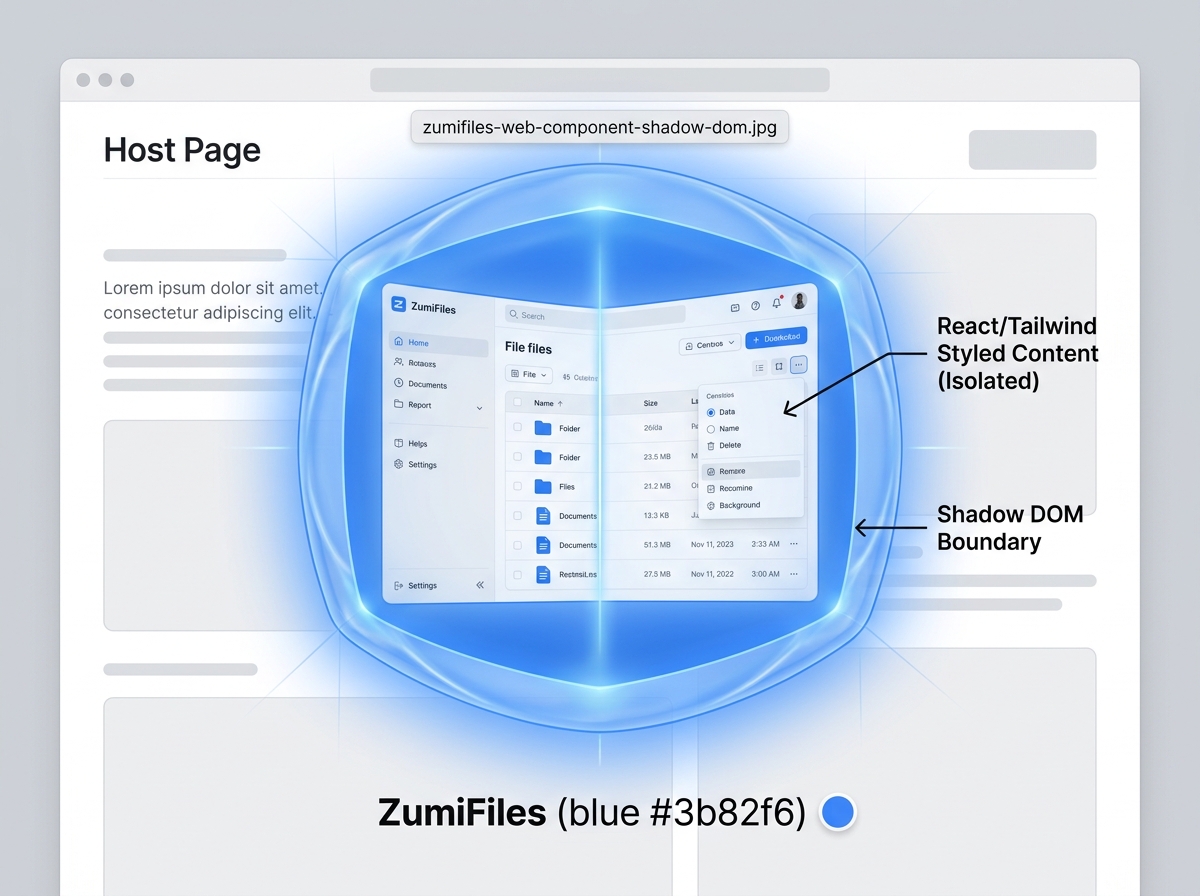
Modern frontend engineering often requires building widgets that can be embedded into third-party websites or browser extensions. In these scenarios, CSS styling collisions are a continuous issue. If your component relies on a utility framework like Tailwind CSS, loading your stylesheet into the host website will pollute their global namespace. Utility classes like .flex, .p-4, or .bg-blue-500 can override the host site's design elements, breaking layouts.
For ZumiFiles, we designed the system to compile as a distributable Web Component, rendering under a single HTML custom element tag: <sidekick-manager>. By utilizing the Shadow DOM, ZumiFiles encapsulates React, internal states, and Tailwind stylesheets-safeguarding styles against external contamination.
Key Technical Concepts Covered
- Vite Library Mode Compiling: Bundling a complex React application into a single executable script.
- Shadow DOM Encapsulation: Shielding CSS scopes against external document modifications.
- Custom Element Registration: Declaring standard lifecycle mounts for modern browsers.
- Outbound Telemetry: Communicating file actions using native DOM CustomEvents.
Part of the engineering behind ZumiFiles.
Compiling Vite React in Library Mode
Instead of building a standard Single Page Application with index.html anchors, ZumiFiles uses Vite's Library Mode. The entire React project, along with assets and third-party libraries, compiles into a single JavaScript executable (e.g. sidekick-manager.iife.js) that can be imported using a standard script tag:
// vite.config.ts configuration snippet
export default defineConfig({
  build: {
    lib: {
      entry: './src/web-component.tsx',
      name: 'ZumiFilesManager',
      formats: ['iife'],
      fileName: () => 'sidekick-manager.iife.js'
    },
    cssCodeSplit: false // Bundle all Tailwind styles into the JS buffer
  }
});
Injecting Styles inside the Shadow DOM
The Shadow DOM acts as a visual shield. Styles defined outside a shadow boundary cannot leak in, and styles defined inside cannot leak out. To mount ZumiFiles securely, we attach a shadow root in "open" mode, then mount our React application directly inside it.
Because CSS code splitting is disabled, Vite compiles our Tailwind styles into a JavaScript string variable. ZumiFiles injects this style string into a <style> tag directly inside the shadow root alongside the React root node:
// web-component.tsx implementation
import React from 'react';
import { createRoot } from 'react-dom/client';
import App from './App';
import tailwindStylesString from './index.css?inline'; // Read raw style text

class ZumiFilesElement extends HTMLElement {
  connectedCallback() {
    // Attach the Shadow DOM boundary
    const shadowRoot = this.attachShadow({ mode: 'open' });

    // Inject Tailwind stylesheet
    const styleEl = document.createElement('style');
    styleEl.textContent = tailwindStylesString;
    shadowRoot.appendChild(styleEl);

    // Create React mount point
    const mountPoint = document.createElement('div');
    mountPoint.style.width = '100%';
    mountPoint.style.height = '100%';
    shadowRoot.appendChild(mountPoint);

    // Mount the React application
    const root = createRoot(mountPoint);
    root.render(<App hostElement={this} />);
  }
}

customElements.define('sidekick-manager', ZumiFilesElement);
Outbound Communication via CustomEvents
Because the React state tree is isolated inside the Shadow DOM, the host environment cannot inspect internal states. To communicate file selections, path changes, and system errors outbound, ZumiFiles uses standard DOM CustomEvents with a sidekick: namespace prefix.
This allows host applications (or browser extensions) to listen to the component exactly as they would listen to a standard button click:
// React event dispatch helper
function dispatchFileSelection(hostElement, selectedFileNames) {
  const event = new CustomEvent('sidekick:selection', {
    detail: { items: selectedFileNames },
    bubbles: true,
    composed: true // Allows the event to cross the Shadow DOM boundary
  });
  hostElement.dispatchEvent(event);
}
In the host website, listening is straightforward:
const manager = document.querySelector('sidekick-manager');
manager.addEventListener('sidekick:selection', (e) => {
  console.log("Selected items in host:", e.detail.items);
});
Conclusion: Portable Browser Components
By encapsulating the React stack and Tailwind CSS styles inside the Shadow DOM, ZumiFiles runs as a sandboxed web component. Developers can drop a professional file manager into any workspace using a single HTML tag, without worrying about style collisions.