What this article covers
- The jobs a browser tab cannot do
- Why the page stays in Chrome
- What it replaced
- One port, and keeping private routes private
- The browser's rules for talking to localhost
- A setup wizard, and a page you can screenshot
- The engine manager
- Installing without a signed download
- The same pieces as a container for a company
- Windows: a plan, not a product
- Android: from a spike to 0.8
- What went wrong along the way
- What I would tell someone building a helper for a web app
Part 6 of 7 in the Building ZumiScribe series. Try ZumiScribe, free in your browser.
The jobs a browser tab cannot do
ZumiScribe is a web page with no server of its own and no account: you bring a key for a speech service, or use a transcriber that runs on your device. In Chrome or Edge you can record, fix speakers, summarise and export with nothing installed, and I wanted that to stay the default. But as the feature list grew, several items turned out to be things a tab cannot do:
- run a large speech engine on your own computer, so audio never leaves it;
- show subtitles in a see-through window over slides or a video call;
- capture the sound of one desktop app, such as the Teams or Zoom app, rather than a browser tab;
- take a picture of a single app's window for snapshots;
- let phones on the same Wi-Fi follow the live captions;
- use a phone's own processor for transcription, from the phone's browser.
Each needs a program on the device. The answer is ZumiScribe Local: a small menu-bar app for the Mac, and an early test version for Android. Neither replaces the web page; they make local things available to it.
Why the page stays in Chrome
Why not put ZumiScribe inside the app's own window? Because the Mac app's built-in web view (WKWebView) has no folder picker, so no File System Access API, which the library and audio files rely on, and no Chrome text reader. So ZumiScribe stays in Chrome or Edge, opened from the website, and the local app never serves the pages.
What it replaced
Before the app, running everything locally meant separate programs: the speech engine on 8765 and 8766, a glossary on 8767, the follow-along relay on 8780, the AssemblyAI token helper on 8781, and Ollama on 11434 for summaries. Most needed Python, and each had its own start command.
The plan, agreed on 22 October 2026, was one app holding the small services, written in Rust inside Tauri so no Python is needed for them. The speech engine stays a separate program because it needs Apple's MLX libraries, which are Python. Ollama stays outside: the app only checks that it is reachable.
One port, and keeping private routes private
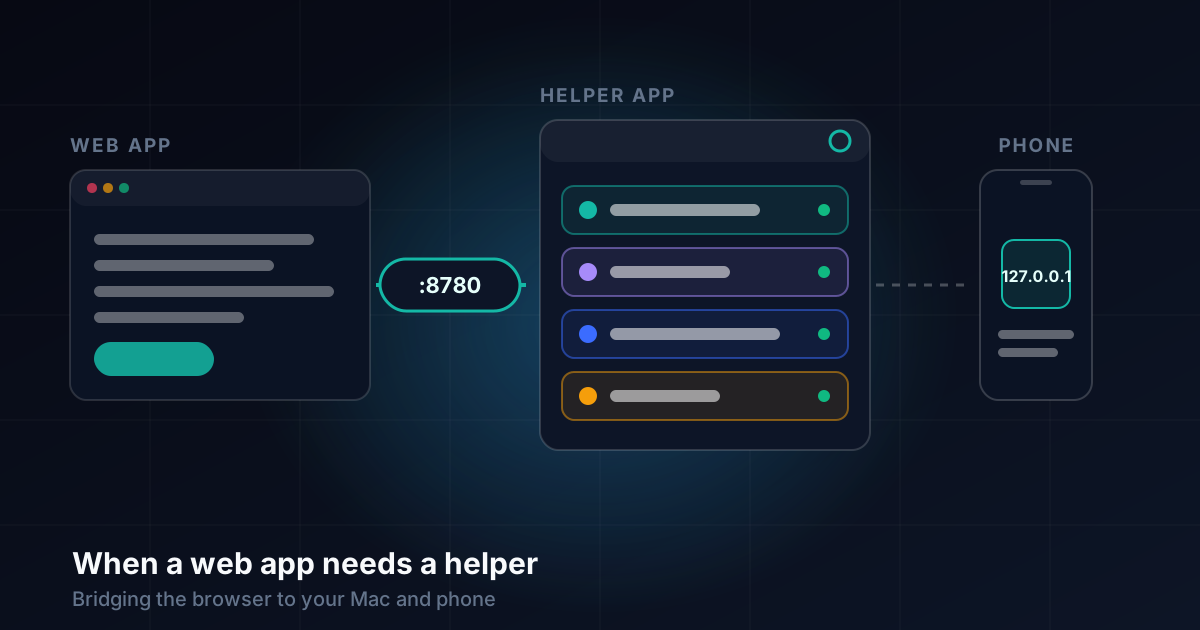
All the small services share one port, 8780, with different paths. The catch is that they do not share an audience. The relay has to be reachable by phones, and sometimes through a tunnel; the glossary, the token helper and the engine controls must never be. So the rule is by path, checked on every request. /follow/* and /ws/* are public, and rooms already need a key (and an optional PIN) to publish. Everything else is private, and must pass four checks:
- The connection comes from this computer (the peer address is loopback), so a phone or another machine on the network is refused even if it forges headers.
- The
Hostheader is127.0.0.1,localhostor[::1], which also stops DNS-rebinding tricks. - No forwarding headers are present. This one matters because a tunnel also connects from this computer, so the peer address alone proves nothing. Tunnels add headers such as
X-Forwarded-*orCF-*, or keep the publicHost. - If there is an
Origin, it must be one of ZumiScribe's own.
The tests simulate a tunnel and a machine on the network and expect every private path to answer 403; the first skeleton had 19 Rust tests over real connections. I also wrote down the weak spot: a tunnel that rewrites Host and strips every header would defeat check 3, though not checks 1 and 4 for a browser, and the private paths hold no keys. If I ever doubt it, a second loopback-only port is a small change.
By default the app listens only on 127.0.0.1. "Let phones on my network follow" is a switch that rebinds it to all interfaces, and only then does macOS ask about incoming connections. If an older script already holds 8780, the app takes the next free port (8781 to 8799) and says which.
The browser's rules for talking to localhost
An https page normally cannot call plain http, but Chrome treats http://127.0.0.1 as a secure context, so a page on https://zumilabs.com may call it. Chrome also asks for a private-network header, and both the Mac app and the Android bridge answer with Access-Control-Allow-Private-Network: true. Safari and Firefox are not supported targets.
The same rule shaped the company server. That exception covers only the local machine, so a server has to be https and wss, behind a proxy with a certificate. Check my setup tests it, with a line that reads "This page is https but ... is not".
Then there is Chrome's local network permission: a page that talks to things on the device triggers a question about letting the site "access other apps and services on this device". Earlier versions looked for the local services before the page had said why, so the prompt could arrive unexplained. For a privacy-focused tool, that is a poor first impression.
So in early November I changed it. Nothing on the computer is probed before the welcome has explained it, or before Settings is opened. The prompt appears only if you choose ZumiScribe Local or the local engine, after the welcome has said why, and the page shows that it is checking. The install page says what to expect: choose Allow, because that is how the page talks to the app on your own Mac.
A setup wizard, and a page you can screenshot
Installing is where people give up, so the first launch is a step-by-step setup window, and every step has a test with a plain pass or fail and what to do about a fail. The plan had eight steps (your Mac, the services, Chrome, the speech engine, phones, summaries, AssemblyAI, finish); it has grown to twelve, adding the Voz + Who and Granite models and other engines you run yourself. Some tests do real work: the engine step transcribes a spoken sentence with speaker labels, and the phone step sends a test caption to a phone.
The Chrome step opens the website's Check my setup page, because the app calling its own /health proves little: failures really show from the browser, where the origin, the https rules and Chrome's permission apply. The page checks that the services answer, the secure connection rules are met, the page's origin is allowed, a test caption goes to the relay and back, the glossary and helper answer, the engine's WebSocket opens and Ollama is reachable, with a microphone test and a live level meter. Each failed line says what to do, and Copy a report gives versions and results, with no keys or text. The aim was a page that a user or an administrator can screenshot first when something is wrong, for the Mac app and a company server alike.
The engine manager
The speech engine (Parakeet for words, Sortformer for speakers) is the heavy part: about 6 GB, Apple silicon only. The app's job is that the user never meets Python. One click downloads a pinned uv, which fetches a private Python, creates two environments from pinned requirement files and downloads the two models from Hugging Face, all inside the app's Application Support folder. The app then starts the engine, watches it, restarts it if it dies, keeps the last log lines and stops it on Quit. Remove deletes the folder.
Files the app downloads itself do not get the browser's quarantine flag, so no extra macOS warnings appear. On 22 October a clean install into an empty folder took 340 seconds, the engine was ready four seconds after starting, and a spoken test sentence came back with a speaker label. If an install fails, Try again carries on from what was already downloaded.
Installing without a signed download
There is no Apple Developer account yet, so the app is ad-hoc signed, and I documented two routes plainly. The quiet one is a Terminal command: curl fetches install.sh, which downloads the zip, checks its checksum, puts the app in Applications and opens it. A file fetched by curl is not marked as downloaded from the internet, so macOS shows nothing. The other is the zip from the browser, with the Open Anyway steps (macOS 15 and later: System Settings, Privacy & Security, Open Anyway; macOS 14 and earlier: right-click, Open).
Signing is a switch for later: with an identity and notarisation settings in the environment, package.sh signs, Tauri notarises, and install.sh is no longer needed. The first version, 0.1.0, was published on 22 October, a download of about 3 MB.
The same pieces as a container for a company
Some companies want nothing installed on anyone's computer. The services are one Rust library with two thin shells, the Tauri app and a headless zumiscribe-server, so the server is the same code with different settings. It ships as a services image of about 53 MB with a compose.yaml and an optional Caddy proxy for automatic https; I built and ran it, including https through Caddy. The systemd unit has not been tried on Linux yet.
In server mode private routes cannot rely on loopback, and there is no sign-in yet: I deferred it until a company asks and will test it. Until then a server is for a trusted network only. It warns at startup when it listens on a non-local address with no sign-in, and /health reports "auth": "none", which Settings shows. The allowed-origins list protects against other web pages, not other people on the network, and the guide says so. A speech engine on a GPU server is planned, not built, and Voz + Who never runs on a server because its licence forbids a hosted service.
Windows: a plan, not a product
Windows is a plan dated 10 November, with nothing built. The services should build as they are, since they already build for Linux. The plan lists about ten Mac-only places in the app, such as opening folders, start at login and Cmd shortcuts; other apps' sound needs a rewrite with WASAPI loopback; and Parakeet's MLX build does not run on Windows, so it gets its own spike while a first release would ship with cloud transcribers and Voz + Who. Testing happens without a PC: GitHub Actions for the installer, a Windows on Arm VM, and one real laptop before telling anyone it works.
Android: from a spike to 0.8
The Android app began as a spike with one question: can a phone transcribe a conversation, with speaker labels, entirely on the phone? It runs Parakeet and speaker labelling through sherpa-onnx on the phone's CPU, with models of about 680 MB downloaded once.
Version 0.4 added the part that matters here: a browser bridge. A foreground service, with a notification and a Stop button, listens on 127.0.0.1 only, on 8765 and 8766, with the same protocols as the Mac engine, so ZumiScribe in the phone's browser sees just another engine. An origin list and a Host check mean it answers only ZumiScribe's pages, through the phone's own address. A wake lock is held only while transcribing. 0.5 was a new look with a download progress bar. 0.6 added on-device caption translation with ML Kit through the same bridge, which roughly doubled the APK from 14 MB to about 27 MB. 0.7 reorganised it into Home, Models and an advanced screen, and made speaker labels optional. 0.8 renamed that screen Test, added a clear progress card and let you cancel a recording. It is still a test version, installed from a file and signed with a debug key.
What went wrong along the way
- The app's web view swallowed dialogs. The setup window's Remove button asked for confirmation with
confirm(), and the web view silently ignored it. It now asks in its own dialog. - A local address shown as a phone address. The wizard once offered an address that only works on the Mac itself as the one for phones. Now only addresses on the network count.
- The container would not build until it copied the whole Rust workspace, because every member's manifest is needed.
- Ollama refused the page. A 403 from Ollama now says which page address to allow, because it needs
OLLAMA_ORIGINSset, and anollama servestarted in a terminal ignores the app-level setting. - A confusing name. The Mac app was first called ZumiScribe, which clashed with ZumiScribe installed from Chrome as an app. It is now ZumiScribe Local.
- Phones have limits browsers do not tell you about. Loading the Voz + Who models in an Android browser made a phone with plenty of memory restart, so that transcriber is not offered on phones at all. On the Android app, speech stretches can still run past the 8 second limit, because the voice detector only cuts at a quiet moment.
What I would tell someone building a helper for a web app
Keep the web app the main thing and the helper small. Decide early which routes are public and which are private, keep the rule in one place, and test it with a fake tunnel and a fake neighbour, not only the happy path. Send Chrome's private-network header, and do not touch localhost until the user has asked for something that needs it and you have said why. Give every setup step a real test, and give people a page they can screenshot. Write the unsigned install steps honestly. And build the core as a library with thin shells from the first day: that is why the company server was a new shell and a configuration, not a rewrite.
Transcripts that know who said what
Live captions, speaker labels, pictures in context and summaries, in your browser. There is no ZumiScribe server: transcripts stay in your browser or your own folder, and you choose which transcriber hears the audio, including ones that run on your own computer.
Try ZumiScribe