What this article covers
- Why I ran the same recording ten times
- The words were the least interesting part
- Speaker separation: where the real spread was
- The voice in the background
- Wrong extra speakers happen too, so suggest a merge
- Short replies, punctuation and the shape of a transcript
- Timing: from milliseconds to model guesses
- Verbatim or cleaned up
- Names and web addresses: almost everyone gets them wrong
- Results at a glance
- What we chose as defaults
- On your own device: a words model plus a speaker step
- What I would tell someone choosing a provider
Part 2 of 7 in the Building ZumiScribe series. Try ZumiScribe, free in your browser.
Why I ran the same recording ten times
ZumiScribe is built around who said what. Each line of a transcript belongs to a speaker and has a start and end time, so you can tap it to hear it, export subtitles or follow along. A service is only useful to us if it returns speaker labels and timings, not just a block of text.
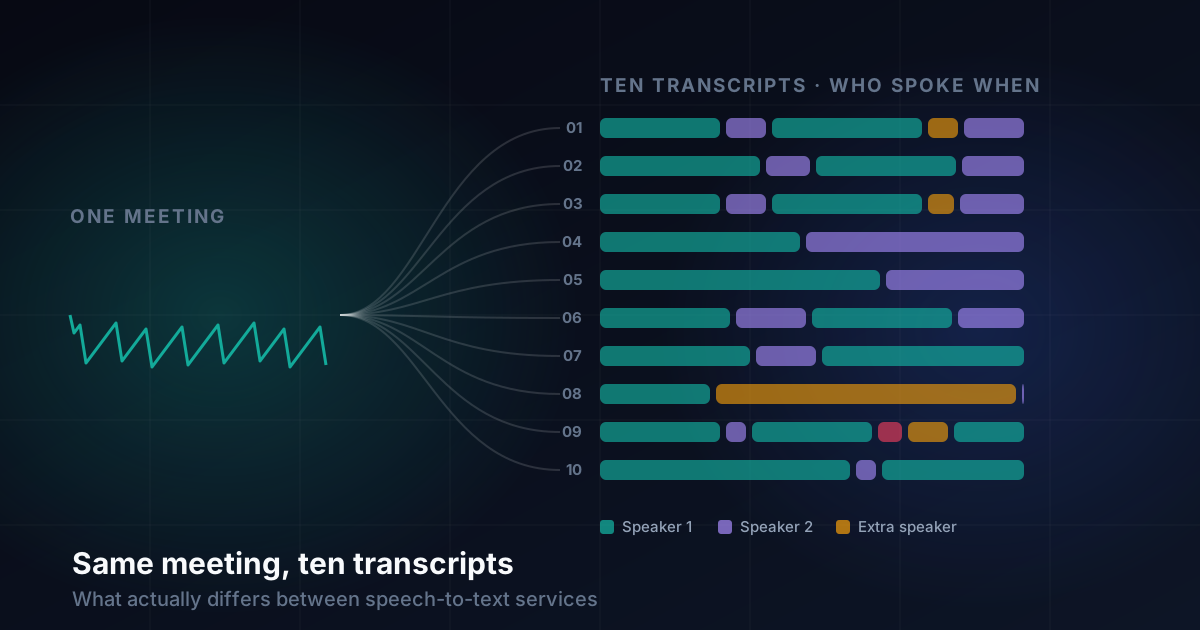
Most services claim both. The only way to see what that means in practice is to give them all the same audio. So I took one recording I expected to be awkward, a four-minute meeting with two main speakers, and sent it unchanged to each service's "transcribe the whole file" option inside ZumiScribe. People interrupt each other, there are plenty of one-word replies, there is a stretch of overlapping speech, and at one point a short piece of recorded audio plays in the background.
The ten services were ElevenLabs, Soniox, Speechmatics, Gemini, AssemblyAI, Azure Speech, OpenAI, Mistral Voxtral, Gladia and Modulate. Modulate was run twice, live and as a whole file, so there are eleven runs.
The fine print matters:
- One recording, default settings, one point in time. The runs were done in October 2026. Services change their models often: ElevenLabs was run with
scribe_v1, and ZumiScribe now usesscribe_v2, which I have not yet re-run. - No verified reference transcript, so there is no word error rate here.
- I judged speakers by reading, not listening. It is a careful reading, not a measurement.
The words were the least interesting part
I expected the main difference to be accuracy. It was not. Among the top services the text was broadly similar; ignore the speaker labels and timings and you would struggle to pick a winner on the words alone.
I counted words per speaker, and the totals ranged from about 600 to about 710. Those counts are rough. They include fillers and some punctuation tokens, and are not a word error rate: a higher count often just means more "um"s were kept. They are useful for spotting a service that lost much of one person's speech, and little else.
The differences that changed what it was like to use a transcript were speaker separation, whether short replies survived, punctuation, timing, and verbatim versus cleaned-up text.
Speaker separation: where the real spread was
This is where the services differed most, and where a mistake does the most damage. A misheard word is an annoyance. A paragraph given to the wrong person changes what the transcript says happened.
Most runs kept the two main speakers apart well, with Speaker 2 at roughly 90 to 100 words. Three stood out for the wrong reasons:
- OpenAI (
gpt-4o-transcribe-diarize) gave Speaker 2 one word and put almost everything else the second person said, about 100 words, under a third speaker. The words and timings were good, but it read as a three-person meeting in which the second person barely spoke. - Gladia cut Speaker 2 to 38 words, garbled one reply, lost another, and invented a fourth speaker for two short lines that belonged to Speaker 2.
- Modulate's whole-file run also had only 38 words for Speaker 2. Its live run did much better, with 95.
Some turn boundaries were in the wrong place too. AssemblyAI split a sentence between the two speakers in two places. Azure Speech joined a short reply from Speaker 1 onto Speaker 2's turn, and split one of Speaker 2's sentences so that its end opened Speaker 1's next turn. Small in word count, jarring to read.
The voice in the background
The most revealing test was one I had not planned. Reading the transcripts, the short piece of audio that plays in the background is most likely a recording coming through the call, not either speaker. So a third speaker label for those few seconds is probably the right answer.
I got this wrong at first. My early notes called it a phantom speaker. On a second reading I changed my mind: the services that labelled it separately were hearing something real.
Five of the eleven runs gave it its own speaker: ElevenLabs, Soniox, Speechmatics, Gladia and Modulate's live run. The others folded it into a main speaker or, in Azure's case, lost most of it. ElevenLabs also put one short line under the third speaker that appears in no other run. It may be faint background audio, or it may be invented; it is on my list to listen to.
Wrong extra speakers happen too, so suggest a merge
Wrong extra speakers also turned up: Gladia's fourth speaker, OpenAI's split of the second person, and a stray one-word reply at the very end that Speechmatics gave to a third speaker.
So the same small test produced one extra speaker that reflects something real and several that are mistakes, and nothing in the transcript says which is which. A speaker with a handful of words could be either.
The design decision is simple. ZumiScribe should offer to merge a speaker with only a few words into the voices around it, and never do it automatically. Merging automatically would have erased the one thing five of the runs got right. A suggestion costs one click when the service was wrong, and nothing when it was right.
Short replies, punctuation and the shape of a transcript
Short replies carry a lot of a meeting's meaning, and they are the easiest thing to swallow into a longer turn.
ElevenLabs was the most complete, catching short overlapping replies others merged away and keeping every filler and repeat. The cost is shape: 32 entries, many tiny, because it follows interruptions closely. It reads choppily, short segments often lack a full stop, and some begin with a stray ellipsis.
Soniox kept all of Speaker 2's replies, placed the overlapping speech on the right speakers, and was the best punctuated, with dashes for broken-off words, colons and quoted speech. It was the easiest to read.
AssemblyAI swallowed a one-word reply into Speaker 1's opening turn, which ran as a single 100-second entry. ZumiScribe now cuts long turns into sentences using the words' own timings, but this run predates that.
OpenAI dropped one short reply and merged another into a longer turn. Gemini gave exactly two speakers in 24 cleanly alternating entries, the tidiest two-person read. Mistral Voxtral was clean and readable with similar turns, though for about ten seconds it seemed to give up on punctuation. Azure Speech punctuated its long turns cleanly; its problems were the boundaries above.
Timing: from milliseconds to model guesses
Tapping a line to hear it, subtitles and follow-along all need start and end times. Poor timings are fine to read and frustrating to use. The range was wide:
- Milliseconds: OpenAI (the best, on sentence-sized segments), AssemblyAI, Gladia (in many short fragments) and Modulate's whole-file run.
- Hundredths of a second: Azure Speech, by sentence.
- Tenths of a second: ElevenLabs (continuous, no gaps), and Soniox, Speechmatics and Mistral Voxtral by sentence.
- Whole seconds, estimated by the model: Gemini. Short interjections often had the same start and end. Not good enough for seeking.
- Late and batched: Modulate live.
Gemini is the odd one out because it is a general language model doing transcription. Our prompt asks for an exact transcription at temperature 0, but a language model can paraphrase, and its timings are an estimate, not a measurement.
Verbatim or cleaned up
Neither camp is wrong; it depends what the transcript is for.
- Verbatim: ElevenLabs, Speechmatics and Soniox kept fillers, false starts and repeats. Good if you want to edit the text yourself.
- Cleaned up: OpenAI, Gladia and Mistral Voxtral removed fillers. AssemblyAI removed most, kept repeats and wrote numbers as digits.
- In between: Azure Speech, which kept a filler in one place.
Clean text is easier to read and quote. Verbatim text is easier to trust, because you can see where someone hesitated.
Names and web addresses: almost everyone gets them wrong
A few names and a web address came up in the meeting. Almost every service misspelled some of them. Only one run, ElevenLabs, spelled the web address correctly every time; a few others got it right once and wrong later. That is unsurprising, since these are the words a speech model has least reason to expect, but it means any transcript you will share or search needs a check of every proper noun.
The fix is custom vocabulary: telling the service in advance which unusual words to expect. Soniox, Speechmatics, Gladia, AssemblyAI, ElevenLabs (key terms in scribe_v2), Mistral Voxtral and Azure Speech (a phrase list) all support some form of it. These runs used defaults, and ZumiScribe's saved results suggest no attendee names were sent as hints. I expect a short list of names would fix many of the errors, but I have not tested that yet.
Results at a glance
This table covers only how each service behaved, not what it transcribed.
| Service (model as run) | Speaker separation | Background voice found | Timing | Verbatim or clean | Notes |
|---|---|---|---|---|---|
ElevenLabs (scribe_v1) |
Clean | Yes | Tenths of a second, continuous | Most verbatim | Most complete; many tiny segments; only run with the web address right throughout |
| Soniox (async) | Clean | Yes | Tenths of a second, by sentence | Verbatim | Best punctuated; all short replies kept |
| Speechmatics (batch) | Clean, one stray extra speaker | Yes | Tenths of a second, by sentence | Verbatim | Very close to Soniox |
Gemini (gemini-2.5-flash) |
Clean, exactly two speakers | No | Whole seconds, model-estimated | Mostly clean | Tidy turns, rough timings |
| AssemblyAI (default model) | Two mid-sentence splits | No | Milliseconds, one entry per turn in this run | Mostly clean | One 100-second turn |
| Azure Speech (fast transcription) | Two boundary errors | No (mostly lost) | Hundredths of a second, by sentence | In between | Clean long turns |
Mistral Voxtral (voxtral-mini-latest) |
Clean two-speaker turns | No | Tenths of a second, by sentence | Clean | One long unpunctuated stretch |
| Modulate (live) | Second speaker found | Yes | Live finals, batched late | — | — |
OpenAI (gpt-4o-transcribe-diarize) |
Second person almost entirely under a third speaker | No | Milliseconds, by sentence | Clean | Best timings |
| Gladia (pre-recorded) | Second speaker truncated; wrong fourth speaker | Yes | Milliseconds, short fragments | Clean | One reply garbled, one missing |
| Modulate (whole file) | Second speaker mostly lost | No | Milliseconds | — | Accurate timings |
On this one recording I would rank ElevenLabs and Soniox joint first (completeness and readability respectively), Speechmatics a close third, then Gemini, then a middle group of AssemblyAI, Azure Speech, Mistral Voxtral, Modulate live and OpenAI, each with a specific weakness, then Gladia, then Modulate's whole-file run. A different recording could change that order.
What we chose as defaults
ZumiScribe suggests:
- Best overall for meetings: ElevenLabs, Soniox or Speechmatics.
- Most readable punctuation: Soniox.
- A complete, verbatim record with names right: ElevenLabs.
- Tidy two-person turns where timing does not matter: Gemini.
- Precise timestamps: ElevenLabs, Soniox, Speechmatics or OpenAI.
The bigger decision was what to build next. Rather than add more services, we are adding the merge-speakers suggestion and custom vocabulary support first, because both improve every service already in the app.
On your own device: a words model plus a speaker step
After these runs we added two transcribers that run entirely on your own device, in the browser on WebGPU or through the ZumiScribe Local app, with no key and no audio sent anywhere:
- Voz + Who from Desert Ant Labs. Voz is NVIDIA's Parakeet TDT 0.6B v3 in their runtime, and Who labels the speakers. About 450 MB to download once, 25 European languages, about 200 times real time on the GPU. The models send Desert Ant Labs a usage count once a month.
- IBM Granite Speech 5.0 (470M parameters, Apache 2.0). About 320 MB, seven languages, about 280 times real time: 31 minutes of audio in under seven seconds.
Neither has been run on the meeting recording yet. On a separate short news broadcast clip, scored against Soniox's transcript (not a verified reference), Granite's word error rate was 22.8% and Voz's 27.7% in file mode.
The more useful insight came from Granite. It only writes words, so on its own it fails our first requirement. Paired with Who as a separate speaker step, it meets it. A fast words-only model plus a separate speaker labeller can therefore be a real contender, at least for anyone who wants their audio to stay on their own machine. It also reopens Whisper, which we had set aside for lacking speaker labels; paired with Who it would bring many more languages. We have not tried that yet.
What I would tell someone choosing a provider
Test on your own audio. One recording told me a lot about how these services differ and little about which is best for you. Accents, the number of speakers, room noise and length all move the results.
Read the speaker labels before the words. The words were similar among the good services. The labels were not, and a wrong label does more harm than a wrong word.
Look at the short replies. Check the one-word answers are still there and with the right person. They go first.
Check the timings if you need them. Whole-second estimates are fine for reading, not for tapping a line to hear it or making subtitles.
Choose verbatim or clean deliberately. Neither is better; pick the service that does the one you want.
Give it your names. Expect names and web addresses to be wrong, and use custom vocabulary where it exists.
Do not fully trust any speaker count. An extra speaker might be a mistake, or something real you did not notice. A tool that merges speakers automatically is guessing.
Re-run when the models change. These results are from October 2026, and at least one service had moved to a newer model before I finished writing this up.
Transcripts that know who said what
Live captions, speaker labels, pictures in context and summaries, in your browser. There is no ZumiScribe server: transcripts stay in your browser or your own folder, and you choose which transcriber hears the audio, including ones that run on your own computer.
Try ZumiScribe